

Rosters, Grace, Rounding & Exceptions
The roster says what was expected. Grace and rounding tidy the punches around it. Exception codes flag whatever still doesn’t match.
This page is a glossary rather than a how-to. It’s here so the terms on your timesheet make sense, and so you can tell us how your business wants these handled.
Every example uses a nine-to-five day. Your own thresholds are set with the biotime team to match how you actually run, so treat the numbers as illustration.
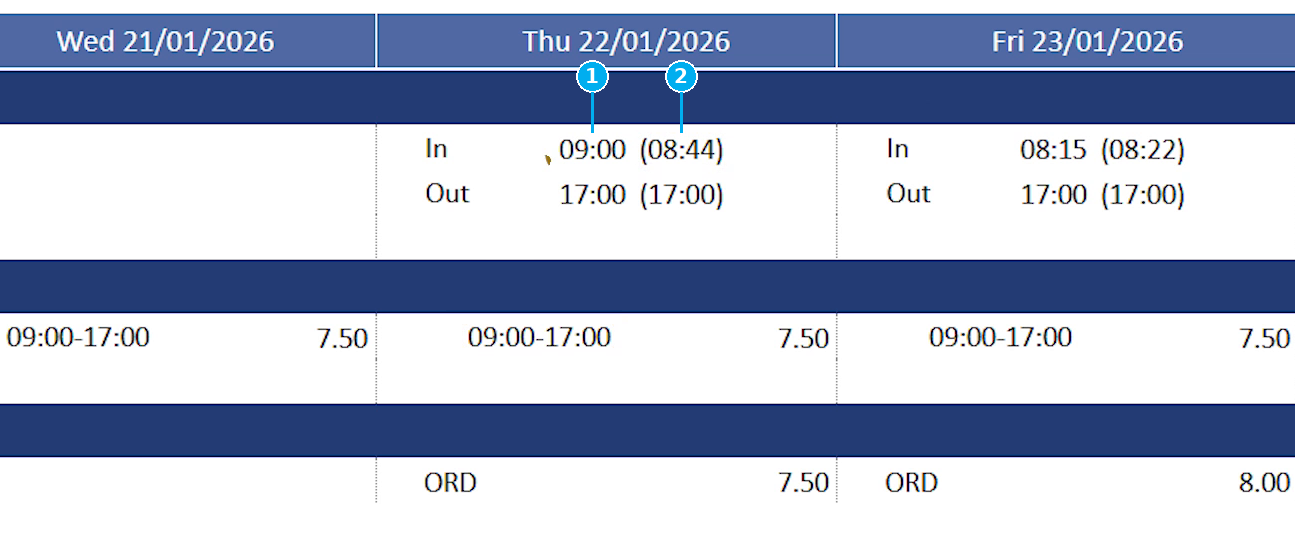
1 the paid time after grace and rounding · 2 the raw clock punch that produced it
On this page
The order things happen in
Each step hands its result to the next, so the sequence matters more than any single setting.
1
The roster sets the expectation
A shift with a start, a finish and a break. Everything after this is measured against it.
2
Grace and rounding tidy the punches
Grace forgives small differences against the roster. Rounding tidies what’s left to a sensible interval.
3
Exceptions flag what’s left
Anything still outside the expected window gets a code for a manager to review.
Grace and rounding never both act on the same punch. A punch inside grace becomes the rostered time and rounding doesn’t run on it — which is why a slightly early clock on usually produces no exception and no odd minutes.
Ways a roster gets built
Most sites use more than one method. What they share is the output: a shift on a date for an employee, which grace, rounding and exceptions all measure against.
| Method | What it’s for | Produces a shift? |
|---|---|---|
| Master Roster | Consistent, repeating patterns — a nine-to-five week, or a longer rotating cycle | Yes |
| Ad hoc segment | A one-off shift with a start and finish, entered directly | Yes |
| Auto roster | biotime matches the employee to a shift — early, afternoon, night — based on when they actually clocked on | Yes, once matched |
| Planner | Drag and drop open shifts onto people or groups. Useful for casual workforces and shifts you can’t assign in advance | Yes |
| Work Pattern | Contracted hours per day rather than shift times. Common for salaried staff | No |
Any of these can be adjusted for one employee afterwards, however the shift was created.
That last column matters more than it looks. Grace and the early and late codes are measured from a shift’s start and finish, so they need a shift to exist at all. Rounding doesn’t, which is why hours on a day with no shift still land as tidy figures.
| Grace | Rounding | Early / late codes | |
|---|---|---|---|
| Day with a rostered shift | Applies | Applies | Apply |
| Day covered only by a Work Pattern | No | Applies | No — the day reads as unrostered |
| Unrostered day | No | Applies | No Roster instead |
Grace
Grace is a window either side of a rostered time where a punch is treated as if it happened at the rostered time. It exists so a few minutes’ difference doesn’t generate work for anyone.
A rule sets how far before the rostered time it reaches and how far after. Clock-on and clock-off usually get different rules.
Clock on at 08:52, inside the window, and you’re paid from 09:00.
Clock on at 08:25, outside it, and you’re paid from 08:25.
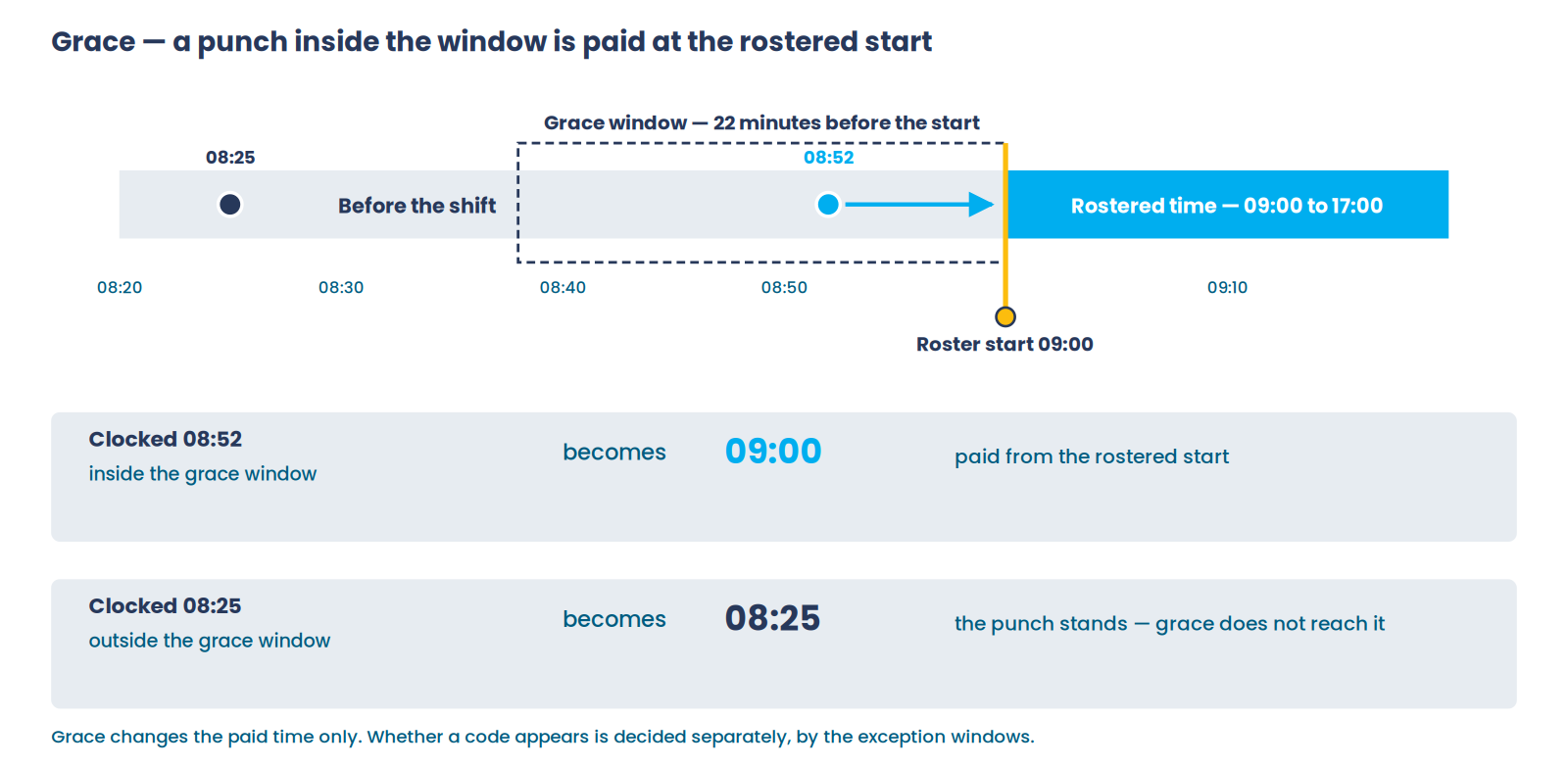
Grace decides what gets paid. It doesn’t decide whether an exception code appears — those are separate thresholds, which is why the two are set up together.
Rounding
Rounding moves a time to the nearest interval once grace has had its turn. It’s what makes a timesheet readable instead of a column of odd minutes.
A rule has an interval and a pivot — what it rounds to, and the point where it starts rounding up rather than down.
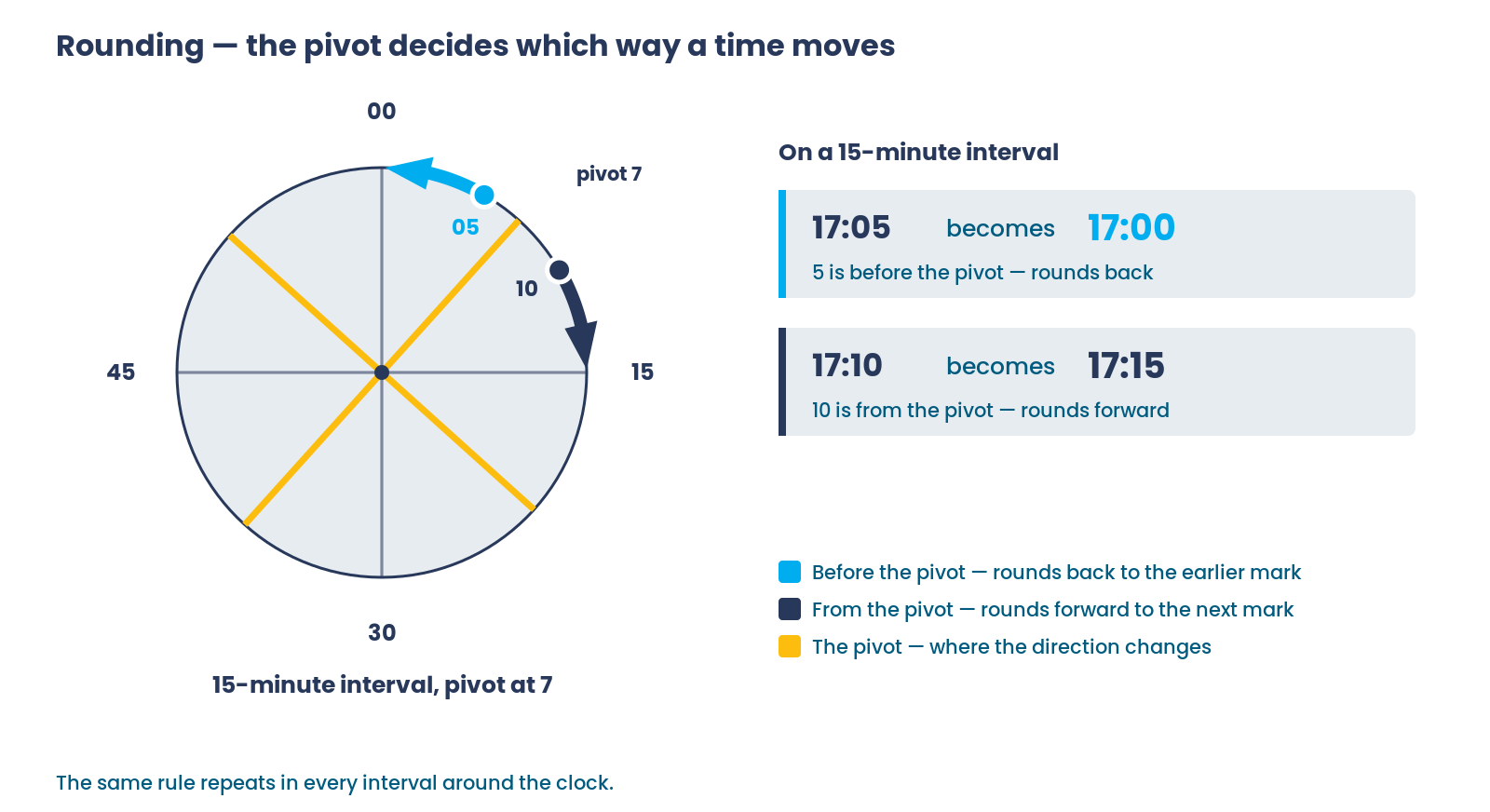
Smaller intervals stay closer to the punch — six minutes lands on tenths of an hour, fifteen moves times further but reads more simply. Rounding can be set separately for clock-on, clock-off, breaks and transfers, and can behave differently on rostered and unrostered days.
Exception codes
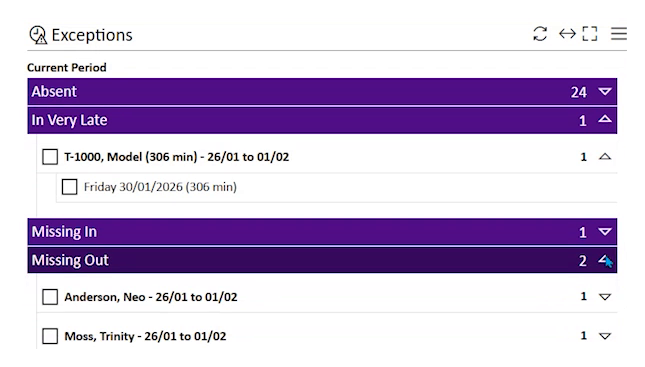
An exception is biotime telling you a punch didn’t match the roster, and by how much. Codes exist so nobody has to read every timesheet — you look at what’s flagged.
They sit on a ladder either side of the rostered start and finish, and the colours follow severity. They also mirror: clocking on early and clocking off late both add time, while clocking on late and clocking off early both take it away.
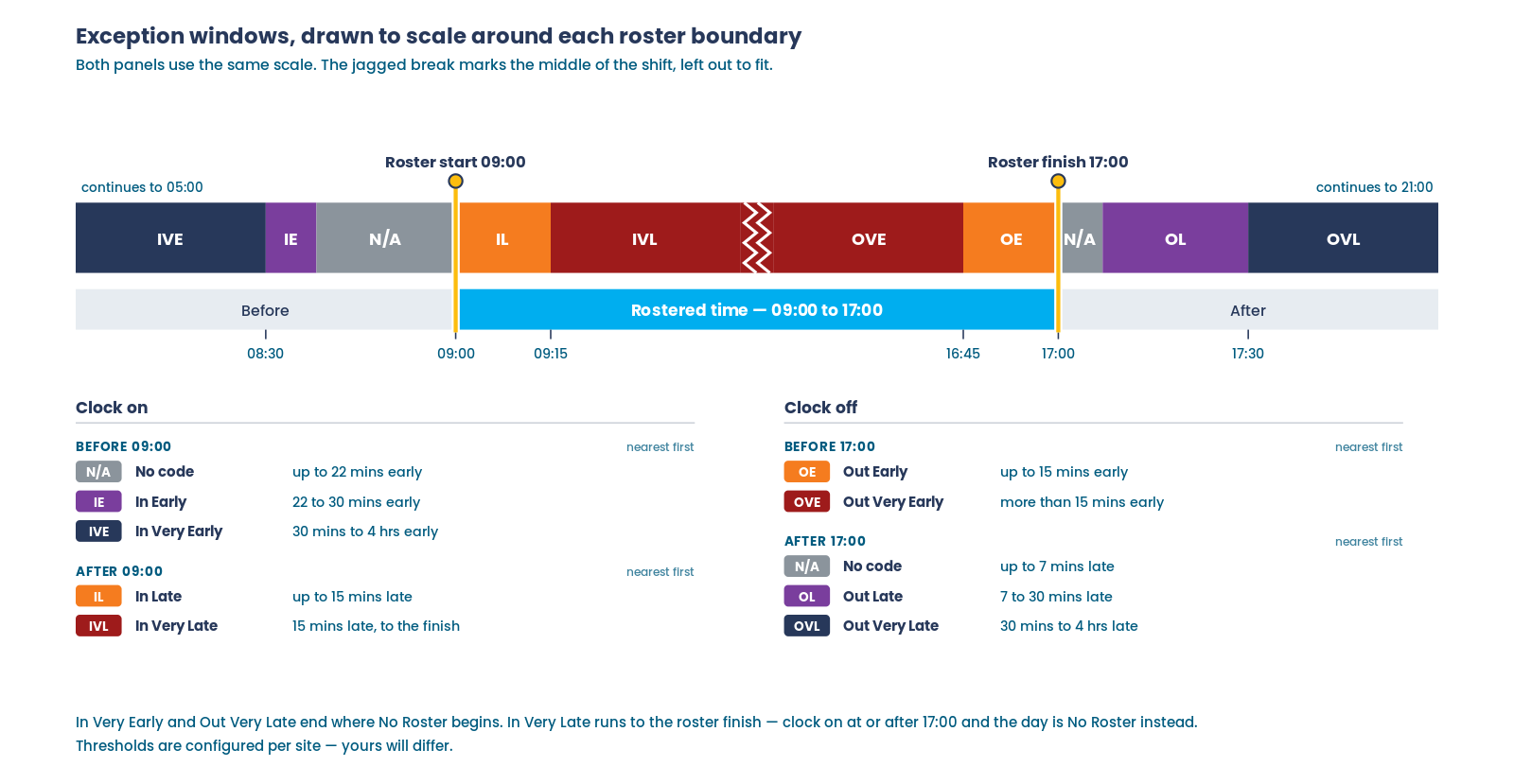
The windows that catch almost every punch are the narrow ones close to the boundary. Clock on after the rostered finish and biotime stops treating it as lateness and records the day as No Roster instead.
Exceptions cover more than clock-on and clock-off. Others catch breaks that are missing, unscheduled, short or exceeded, plus missing punches, absence, working outside a geofence, and conditions such as insufficient rest between shifts.
Important: Names and short codes are set per site. What one customer calls In Early with the code IE, another calls Early Arrival with EA. Any code can also be switched off entirely.
What we’ll ask you
You don’t need to arrive with numbers. These are the decisions the setup turns on, and they’re much easier to answer in your own words than in ours.
- How early can someone clock on before it stops counting as their rostered start? How late?
- Should the end of the day get the same tolerances as the start? Usually not — people arrive early far more often than they leave late.
- What interval should times round to, and does that differ for breaks?
- Which exceptions do you actually want to see, and what do you call them?
- What should happen when someone works a day they weren’t rostered for?
Glossary
| Term | Means |
|---|---|
| Punch | A single clocking event — on, off, break start or break end |
| Segment | A block of time on a timesheet, produced from punches and the roster |
| Roster | The shift an employee was expected to work on a date |
| Ad hoc segment | A one-off shift entered directly rather than generated from a pattern |
| Grace | A window where a punch is treated as if it happened at the rostered time |
| Rounding | Moving a time to the nearest interval, using a pivot to decide up or down |
| Pivot | The point inside a rounding interval where rounding switches from down to up |
| Exception | A flag showing a punch didn’t match the roster, with a code naming how |
| Unrostered day | A day worked with no roster to measure against |
| Approval | A manager accepting or declining flagged time so it can be paid |
FAQ
An employee clocked on early and nothing was flagged. Why?
They were inside the grace window, so the punch was treated as if it happened at the rostered start. That’s grace working as intended.
The timesheet shows a different time from the clock. Is that wrong?
Usually not. The clocked time is what happened; the paid time is what your rules produce after grace and rounding. Both are kept, so the original punch is always there to look at.
Why did two employees clocking at the same minute get different codes?
Their rosters differ. Every threshold is measured from the rostered start and finish, so the same clock time can be early against one shift and late against another.
What does No Roster mean?
The punch was too far from any rostered shift for biotime to treat it as a very early or very late arrival. It usually means someone worked a day they weren’t rostered for, or a roster is missing.
Do exceptions stop someone being paid?
Not by themselves. An exception flags time for review. Whether that time needs approval before it pays depends on how your site is set up.
Related
Need a hand?
Our support team knows biotime inside out. Send us a message and we’ll get back to you, usually within one business day.
Prefer to call? AU 1300 139 460 · NZ 0800 111 438
From overseas: +61 7 5613 2700 · +64 9 820 3444
Monday to Friday, 8:30am – 5:00pm (AEST/NZST)