

Premiums, Allowances & Compensation
A premium is an extra payment biotime adds to a timesheet when something about the day earns it — a long shift, an early or late-night shift, a trip using a personal vehicle. Your award decides which ones exist and what sets each one off.
Premium, allowance and compensation all describe the same thing. Awards use whichever word suits them, and this page uses all three — though the product itself says premium, so that’s the word you’ll meet on a timesheet.
Think of the kinds of payment they cover:
A meal allowance that pays once someone has worked ten hours.
An afternoon allowance for anyone who starts after 2pm.
A driver claiming thirty kilometres for an unexpected trip.
Which of these your people get comes down to the premium rules on their award. Those are configured with the biotime team to match your agreement, so this page describes how premiums behave rather than how to build one.
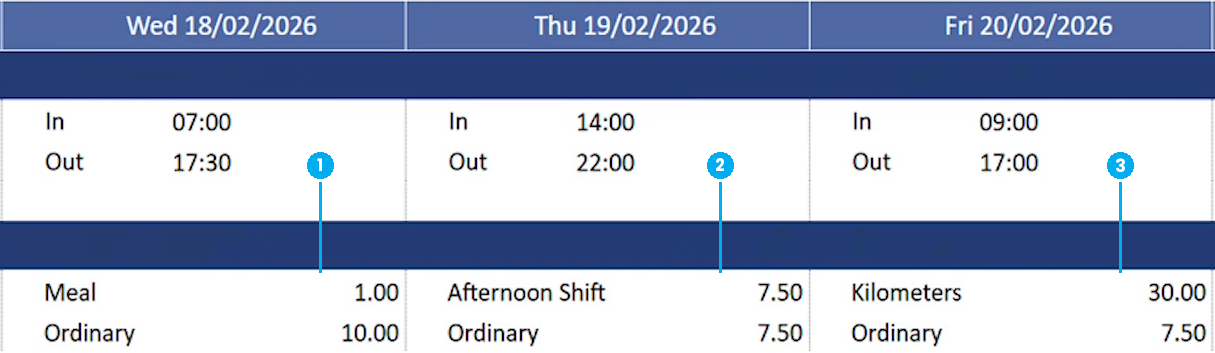
1 meal allowance · 2 afternoon shift allowance · 3 kilometers allowance
On this page
A premium adds, it doesn’t reclassify
Worth getting straight early, because it’s the distinction people trip on.
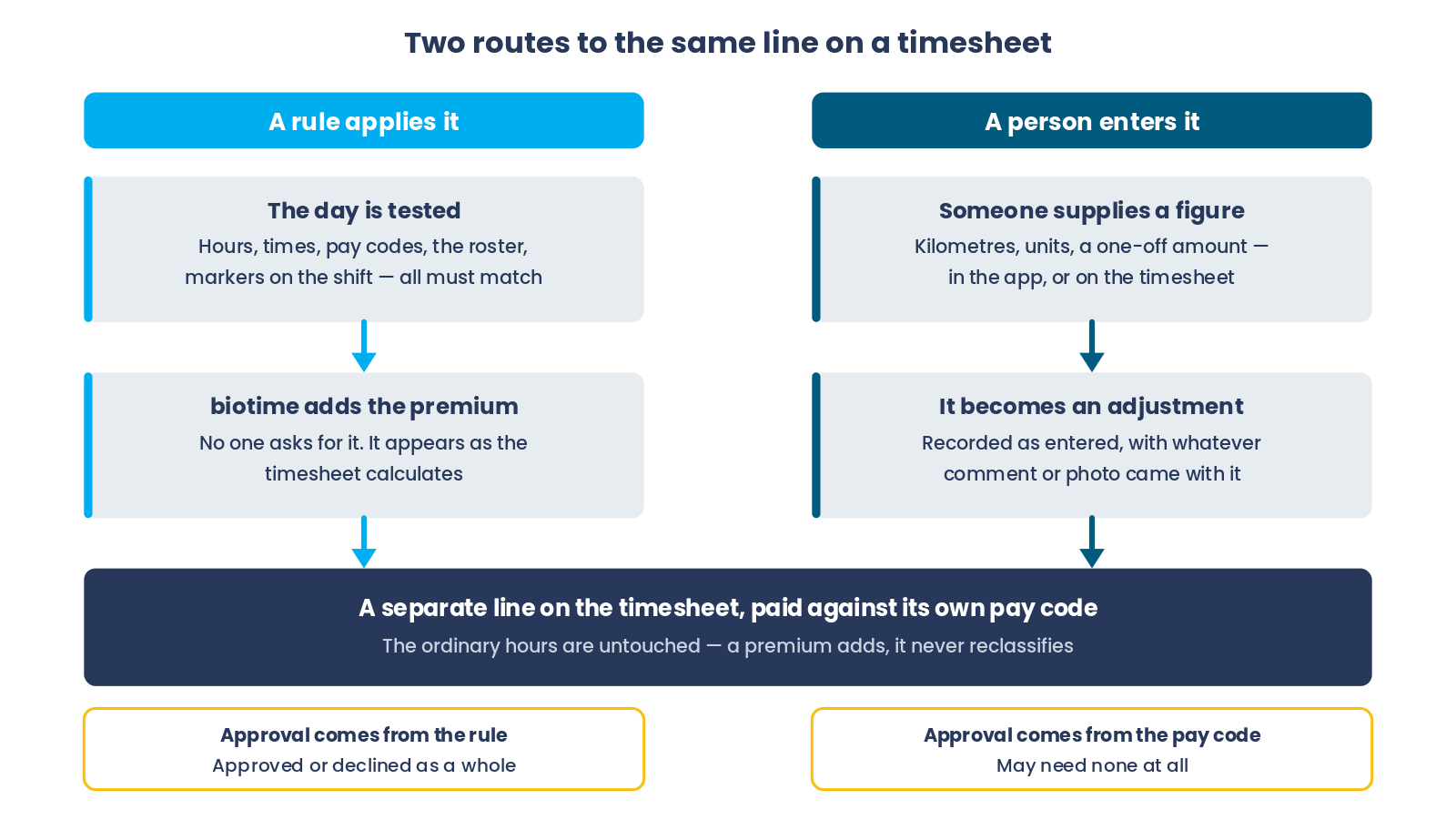
Overtime takes hours someone already worked and moves them to a different pay code — the same time, paid differently. A premium doesn’t touch worked time at all. It adds a separate line with its own pay code, and the ordinary hours stay exactly where they were.
So one day can carry ordinary hours, overtime and two allowances at once, and none of them are competing for the same minutes.
Three common ways an allowance arrives
Every allowance arrives one of three ways, and an award can use more than one at once:
1
After a threshold
Someone passes a number of hours and the allowance pays. The ten-hour meal allowance is this shape.
2
At a time of day
The shift starts, runs through or finishes at a time that earns it — an afternoon allowance for a start after 2pm.
3
Entered by a person
Somebody supplies a figure biotime has no way of knowing, like kilometres driven. Entered in the app by the employee, or on the timesheet by a supervisor.
The first two are rules. biotime watches every day and applies them without anyone asking. The third isn’t a rule at all — it’s a manual entry, which is why it looks different on a timesheet and takes a different route to approval.
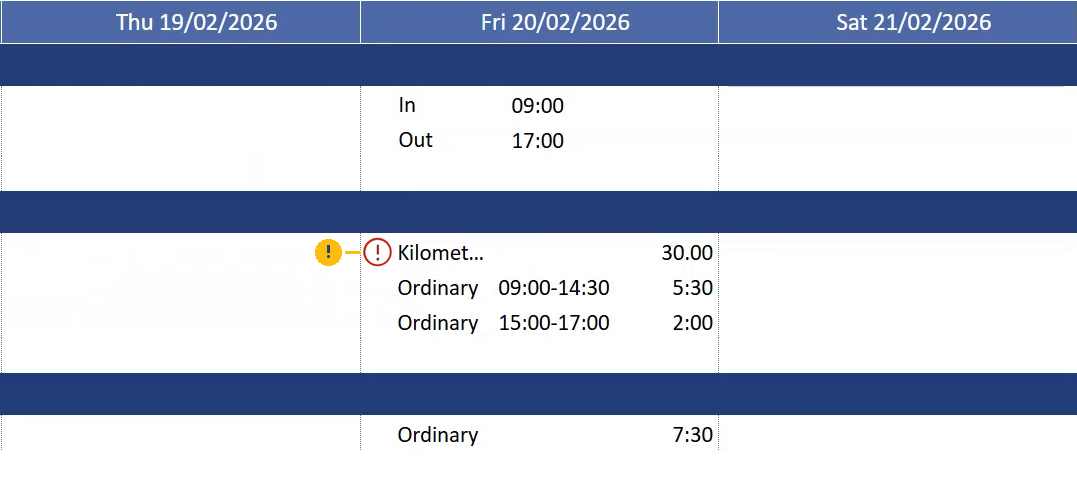
1 the warning icon, marking an allowance still waiting on a decision
Important: The warning icon flags a manually entered allowance that’s still waiting on a decision. Until it’s approved or declined, it stays on the timesheet marked like this.
What can set a premium off
A rule can look at almost anything about the day. These are the families, and most rules combine several:
| What it looks at | Examples |
|---|---|
| Hours worked | A total for the day, the week or the pay period, or a stretch worked without a break |
| Times of day | Started after, started between, worked through a window, finished before |
| Pay codes | Which kinds of time count towards it, and which are ignored |
| The day itself | Days of the week, public holidays, and whether the holiday is normally worked |
| The roster | Whether a roster, Master Roster or Work Pattern exists, and whether they worked more or less than it |
| Where they worked | A department, location or other part of your structure |
| Markers on the shift | A tag put on the rostered shift, or held against the employee |
| How often | Limits, so an allowance pays once a day, once a period, or only on consecutive days |
Every condition on a rule has to be satisfied, which is why two people working what look like identical days can land on different allowances.
Markers are the most flexible of these and worth knowing about. Where an allowance is hard to describe purely in hours and times — an afternoon shift your business defines by more than its start time — tagging the shift and matching on the tag is usually how it gets done.
How much it pays
Two separate decisions: what gets measured, and how that becomes a payment.
What’s measured might be a set value, the hours actually worked, the rostered hours, the overlap between the shift and a window, the time before or after a boundary, or a figure held against the employee.
How it converts is one of three: a flat amount, a rate per hour, or a percentage.
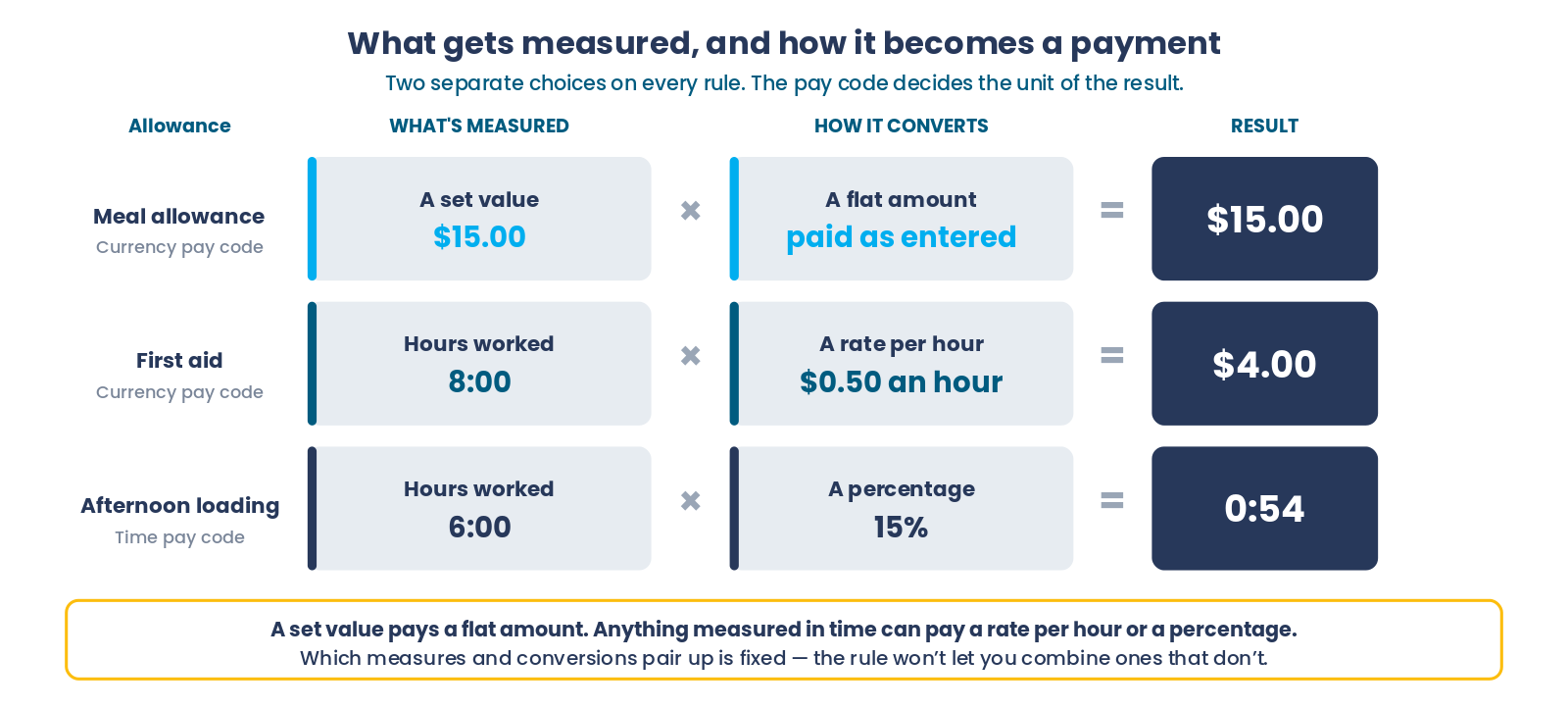
Whether the result reads as money, hours or a plain count comes from the pay code it pays against. That’s what makes it possible to pay an allowance in kilometres or units rather than in dollars or time.
Approval
A premium either needs approval or it doesn’t. That’s set on the rule, and it applies to the whole thing.
This is a real difference from overtime, where the first block can pay automatically while the higher-rate hours wait for a manager. A premium doesn’t split like that — it’s approved, declined, or it never needed approving.
Premiums waiting on a decision appear in the same approvals list as everything else, so there’s no separate place for a manager to look.
Manual entries are the exception once more. Whether one needs approval comes from its pay code rather than from any rule, so an allowance somebody types in can land on the timesheet immediately or wait for a manager, depending which pay code it goes against.
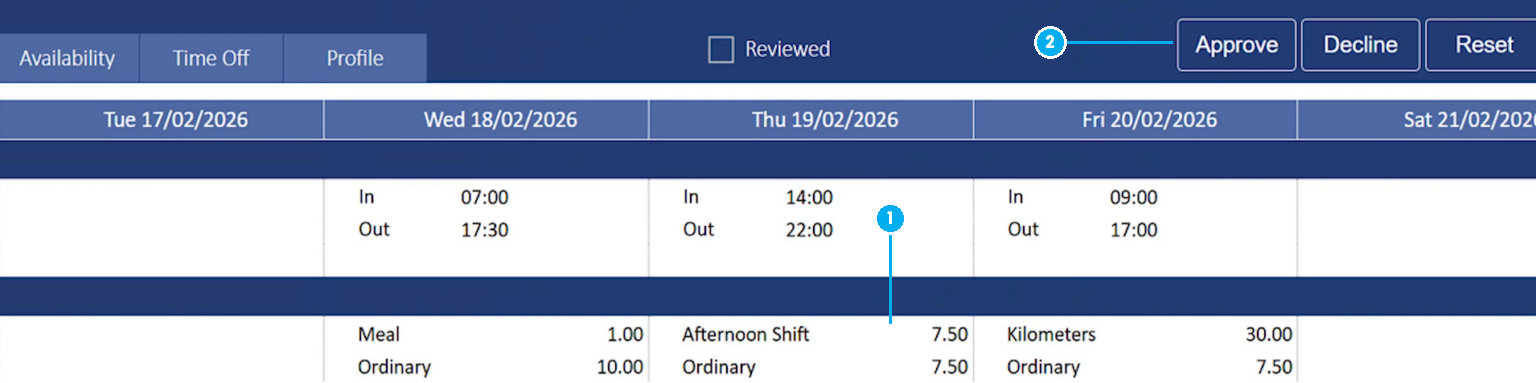
1 the afternoon shift premium, sitting with the day’s worked hours · 2 approve or decline it from here
Why a premium didn’t happen
Ordered by how often each turns out to be the actual cause, so it’s worth working down rather than jumping to the last one:
- Another condition on the rule wasn’t met. Most rules test several things together — the hours, the kind of day, the pay codes involved — and every one of them has to be satisfied. Passing one condition isn’t the same as passing all of them, which is why an otherwise-identical day can miss out.
- A limit had already been reached. Some rules cap how often an allowance can pay — once a day, once a pay period, only on consecutive days. A day that would otherwise qualify pays nothing once the limit’s hit, and nothing on the timesheet flags that it was skipped.
- A manual entry hasn’t been made yet, or went in against the wrong pay code. An allowance that depends on someone telling biotime a figure — kilometres driven, for instance — only appears once that figure is entered. Until then there’s no line to see, and no error either.
- The award doesn’t pay it. Premium rules are built per award to match each agreement, so two people can work the same kind of day and only one of them is on a rule that pays for it.
If you’ve worked down that list and it still looks wrong, that’s the point to raise it with us. Say which of the four you’ve already ruled out — it saves us covering the same ground and gets to the answer faster.
FAQ
Why did two people on the same shift get different allowances?
Because the rules look at more than the hours. Where someone worked, what their roster said, and any markers on their shift all feed in, so two identical-looking days can qualify differently.
Can one person get more than one allowance in a day?
Yes. Premiums add rather than reclassify, so each one is its own line and they don’t compete for the same time. A day can carry ordinary hours, overtime and several allowances together.
A driver’s claim paid straight away without approval. Is that right?
Probably. A manually entered allowance takes its approval requirement from its pay code, not from a premium rule — so if that pay code doesn’t require approval, it goes onto the timesheet as soon as it’s entered.
Can an allowance be paid in kilometres rather than hours or dollars?
Yes. The pay code decides the unit, so a premium can pay a count just as easily as an amount of money or a length of time.
Our agreement pays an allowance biotime isn’t paying at all. What now?
First check it’s actually on your award — premium rules are configured per award to match your agreement, so an allowance the agreement pays but biotime doesn’t is something we add with you rather than something to switch on at your end. Get in touch and tell us the employee, the date, and what you expected to see — that’s usually enough to find it quickly.
Related
- Overtime & Excess Hours
- Rosters, Grace, Rounding & Exceptions
- Breaks in biotime
- Work Patterns
- Approval Panel Guide
Need a hand?
Our support team knows biotime inside out. Send us a message and we’ll get back to you, usually within one business day.
Prefer to call? AU 1300 139 460 · NZ 0800 111 438
From overseas: +61 7 5613 2700 · +64 9 820 3444
Monday to Friday, 8:30am – 5:00pm (AEST/NZST)